What Are AI Agents? How They Work, Types, Benefits, and Risks
Learn how AI agents work, their types, benefits, risks, and uses.
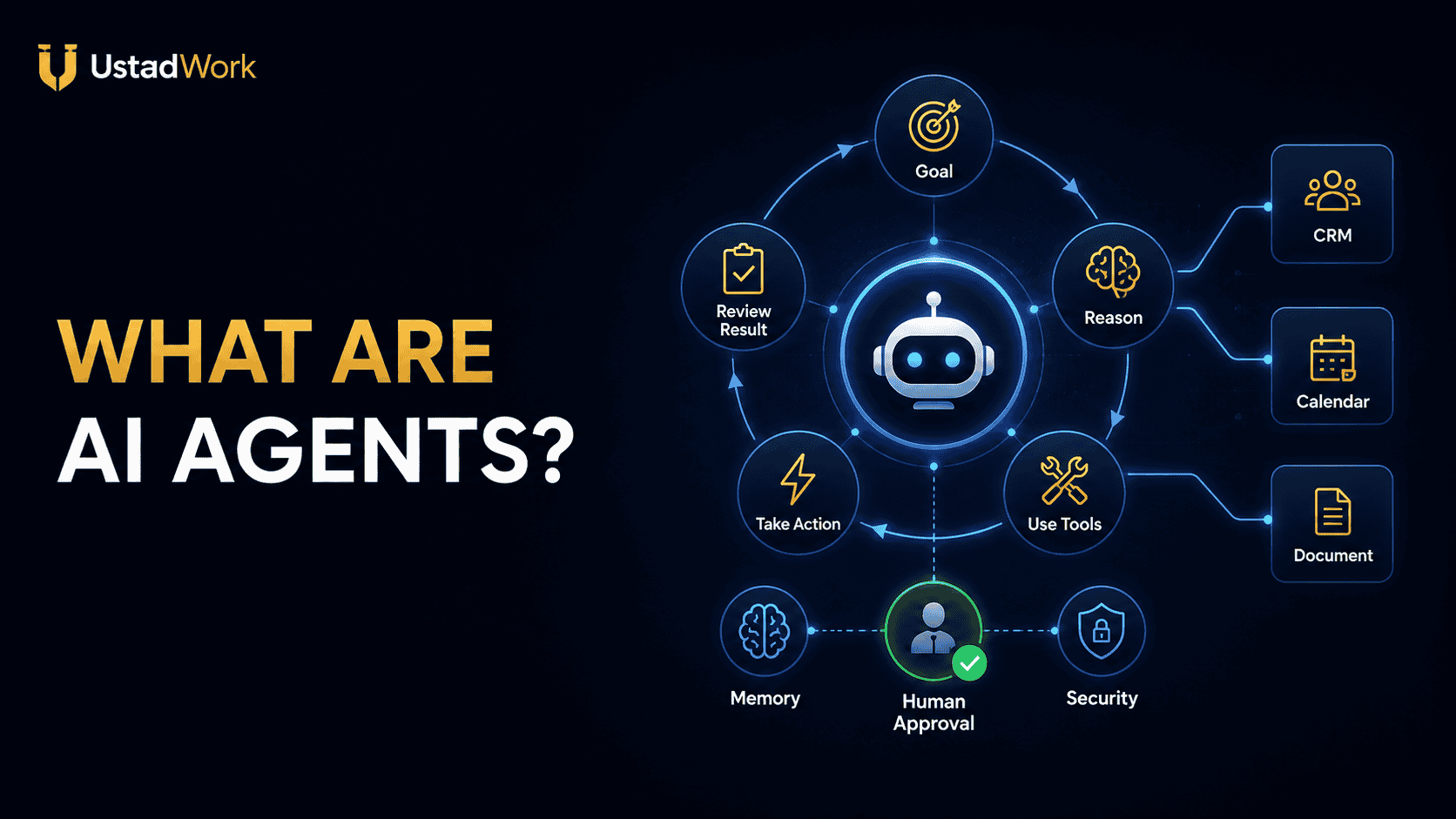
What Are AI Agents?
AI agents are software systems designed to pursue a goal, decide what steps may be required, use connected tools, observe the results, and continue working until the task is completed or a stopping condition is reached.
A standard AI chatbot usually responds with text. An agent may go further by searching a knowledge base, checking a calendar, reading a document, updating a CRM, running code, sending a draft for approval, or coordinating several steps across business systems.
The amount of independence varies. Some agents follow tightly controlled workflows and require approval before every important action. Others can plan several steps, select tools, recover from errors, and ask for help only when they encounter a blocker.
This guide explains what are AI agents, how they work, where they provide value, and which risks businesses should control before deployment. When professional implementation is required, you can post an AI-agent project on UstadWork or browse AI and automation services.
A standard AI chatbot usually responds with text. An agent may go further by searching a knowledge base, checking a calendar, reading a document, updating a CRM, running code, sending a draft for approval, or coordinating several steps across business systems.
The amount of independence varies. Some agents follow tightly controlled workflows and require approval before every important action. Others can plan several steps, select tools, recover from errors, and ask for help only when they encounter a blocker.
This guide explains what are AI agents, how they work, where they provide value, and which risks businesses should control before deployment. When professional implementation is required, you can post an AI-agent project on UstadWork or browse AI and automation services.
Quick Answer: What Makes Software an AI Agent?
A useful AI agent normally has five basic capabilities:
It receives a goal: The user or system defines what result is required.
It understands context: The agent reads instructions, business information, files, prior activity, or external data.
It decides what to do next: The model selects a step based on the goal and available information.
It uses tools: The agent may search, calculate, retrieve data, call an API, update software, or generate a deliverable.
It checks progress: The result of each action becomes new information for the next decision.
An agent is therefore more than a single AI response. It operates through a repeated cycle of understanding, deciding, acting, observing, and stopping.
It receives a goal: The user or system defines what result is required.
It understands context: The agent reads instructions, business information, files, prior activity, or external data.
It decides what to do next: The model selects a step based on the goal and available information.
It uses tools: The agent may search, calculate, retrieve data, call an API, update software, or generate a deliverable.
It checks progress: The result of each action becomes new information for the next decision.
An agent is therefore more than a single AI response. It operates through a repeated cycle of understanding, deciding, acting, observing, and stopping.
AI Agent vs Chatbot vs Traditional Automation
These technologies can overlap, but they are not identical.
Traditional automation follows predefined rules. For example, when a form is submitted, create a CRM record and send a confirmation email. The steps are decided in advance.
An AI chatbot mainly holds a conversation and generates responses. It may answer questions from supplied documents but might not take actions in external systems.
An AI agent can interpret a goal and decide which available actions are appropriate. It may gather information, select tools, compare results, revise its plan, and complete several connected steps.
A chatbot can become part of an agent when it receives tools and permission to perform work. Similarly, an agent may use traditional automation for predictable steps while applying AI only where judgement or interpretation is needed.
Traditional automation follows predefined rules. For example, when a form is submitted, create a CRM record and send a confirmation email. The steps are decided in advance.
An AI chatbot mainly holds a conversation and generates responses. It may answer questions from supplied documents but might not take actions in external systems.
An AI agent can interpret a goal and decide which available actions are appropriate. It may gather information, select tools, compare results, revise its plan, and complete several connected steps.
A chatbot can become part of an agent when it receives tools and permission to perform work. Similarly, an agent may use traditional automation for predictable steps while applying AI only where judgement or interpretation is needed.
How AI Agents Work Step by Step
A simplified agent workflow looks like this:
1. Receive the request
The user, application, or scheduled event provides a goal.
2. Gather context
The agent reviews instructions, memory, knowledge sources, files, account data, or previous results.
3. Create or select a plan
It decides which steps and tools may be necessary.
4. Take an action
The agent calls a tool, searches data, runs code, creates a draft, or updates a system.
5. Observe the result
It checks whether the action succeeded and what new information was returned.
6. Continue, revise, or escalate
The agent repeats the cycle, changes its approach, requests missing information, or pauses for human approval.
7. Stop and report
The process ends when the goal is completed, a limit is reached, or a person must make the final decision.
1. Receive the request
The user, application, or scheduled event provides a goal.
2. Gather context
The agent reviews instructions, memory, knowledge sources, files, account data, or previous results.
3. Create or select a plan
It decides which steps and tools may be necessary.
4. Take an action
The agent calls a tool, searches data, runs code, creates a draft, or updates a system.
5. Observe the result
It checks whether the action succeeded and what new information was returned.
6. Continue, revise, or escalate
The agent repeats the cycle, changes its approach, requests missing information, or pauses for human approval.
7. Stop and report
The process ends when the goal is completed, a limit is reached, or a person must make the final decision.
The Core Components of an AI Agent
AI-agent platforms use different terminology, but most systems contain a similar set of components.
Model:
The language or multimodal model interprets instructions, reasons about the task, and selects the next action.
Goal and instructions:
These define the agent's purpose, responsibilities, tone, boundaries, and definition of success.
Grounding and knowledge:
The agent may retrieve reliable information from documents, databases, search systems, policies, or business records.
Tools:
Tools let the agent take actions such as searching, calculating, sending a request, updating software, or running code.
Memory and state:
State records what has happened during the current task. Longer-term memory may store relevant preferences, facts, or previous outcomes.
Orchestration:
The orchestration layer controls the agent loop, tool selection, handoffs, retries, and stopping conditions.
Guardrails:
Guardrails validate inputs, outputs, permissions, policies, and high-risk actions.
Runtime and observability:
The runtime executes the workflow, while logs and traces help teams understand decisions, tool calls, failures, costs, and performance.
Model:
The language or multimodal model interprets instructions, reasons about the task, and selects the next action.
Goal and instructions:
These define the agent's purpose, responsibilities, tone, boundaries, and definition of success.
Grounding and knowledge:
The agent may retrieve reliable information from documents, databases, search systems, policies, or business records.
Tools:
Tools let the agent take actions such as searching, calculating, sending a request, updating software, or running code.
Memory and state:
State records what has happened during the current task. Longer-term memory may store relevant preferences, facts, or previous outcomes.
Orchestration:
The orchestration layer controls the agent loop, tool selection, handoffs, retries, and stopping conditions.
Guardrails:
Guardrails validate inputs, outputs, permissions, policies, and high-risk actions.
Runtime and observability:
The runtime executes the workflow, while logs and traces help teams understand decisions, tool calls, failures, costs, and performance.
The Role of Tools
Without tools, an AI system may only generate text based on its available context. Tools allow an agent to interact with the outside world.
Common tools include:
Web and internal search.
CRM lookup and updates.
Email drafting or sending.
Calendar availability and booking.
Database queries.
Document retrieval.
Spreadsheet calculations.
Code execution.
Payment or order-system actions.
Customer-support ticket management.
Business APIs.
Every tool increases capability, but it can also increase risk. A calendar-reading tool is less sensitive than a tool that can delete events. A payment-status tool is less dangerous than one that can issue refunds without approval.
Permissions should therefore match the exact job the agent is expected to perform.
Common tools include:
Web and internal search.
CRM lookup and updates.
Email drafting or sending.
Calendar availability and booking.
Database queries.
Document retrieval.
Spreadsheet calculations.
Code execution.
Payment or order-system actions.
Customer-support ticket management.
Business APIs.
Every tool increases capability, but it can also increase risk. A calendar-reading tool is less sensitive than a tool that can delete events. A payment-status tool is less dangerous than one that can issue refunds without approval.
Permissions should therefore match the exact job the agent is expected to perform.
Why Memory and State Matter
An agent needs state to know what has already happened during a multi-step task. Without state, it may repeat actions, forget an earlier result, or lose track of the original goal.
Short-term state may include the current conversation, tool results, completed steps, errors, and pending approvals.
Long-term memory may include approved user preferences, recurring instructions, previous outcomes, or business information that remains useful across sessions.
Memory should be controlled carefully. Storing unnecessary customer details, private communications, or incorrect assumptions can create privacy and accuracy problems.
Define what the agent may remember, how long the information is retained, who can access it, and how a user can correct or delete it.
Short-term state may include the current conversation, tool results, completed steps, errors, and pending approvals.
Long-term memory may include approved user preferences, recurring instructions, previous outcomes, or business information that remains useful across sessions.
Memory should be controlled carefully. Storing unnecessary customer details, private communications, or incorrect assumptions can create privacy and accuracy problems.
Define what the agent may remember, how long the information is retained, who can access it, and how a user can correct or delete it.
Practical Types of AI Agents
There is no single universal classification, but these practical categories help businesses understand common designs.
Conversational agents:
Answer questions, guide users, and may perform limited actions during a conversation.
Workflow agents:
Complete a structured process containing several predictable stages and selected AI decisions.
Research agents:
Search multiple sources, compare evidence, identify gaps, and prepare a structured report.
Customer-service agents:
Answer questions, retrieve account information, classify issues, and escalate complex cases.
Sales agents:
Research prospects, qualify leads, prepare outreach, update CRM records, or schedule follow-up.
Coding agents:
Inspect repositories, explain code, edit files, run tests, and support Git workflows.
Operations agents:
Handle recurring administrative processes such as inbox triage, reporting, data entry, or scheduling.
Autonomous agents:
Operate with broader discretion across longer tasks, usually with cost, time, permission, and approval limits.
Conversational agents:
Answer questions, guide users, and may perform limited actions during a conversation.
Workflow agents:
Complete a structured process containing several predictable stages and selected AI decisions.
Research agents:
Search multiple sources, compare evidence, identify gaps, and prepare a structured report.
Customer-service agents:
Answer questions, retrieve account information, classify issues, and escalate complex cases.
Sales agents:
Research prospects, qualify leads, prepare outreach, update CRM records, or schedule follow-up.
Coding agents:
Inspect repositories, explain code, edit files, run tests, and support Git workflows.
Operations agents:
Handle recurring administrative processes such as inbox triage, reporting, data entry, or scheduling.
Autonomous agents:
Operate with broader discretion across longer tasks, usually with cost, time, permission, and approval limits.
Single-Agent vs Multi-Agent Systems
A single agent handles the complete task using one set of instructions and tools. This is often easier to build, test, secure, and maintain.
A multi-agent system divides work among specialists. For example:
A coordinator receives the request.
A research agent gathers information.
A writing agent creates the draft.
A review agent checks quality.
A final agent prepares the approved output.
Multi-agent designs can help when tasks require clearly different skills or access permissions. They also create additional coordination, cost, debugging, and accountability challenges.
Start with one agent or a controlled workflow unless the project has a clear reason to separate responsibilities.
A multi-agent system divides work among specialists. For example:
A coordinator receives the request.
A research agent gathers information.
A writing agent creates the draft.
A review agent checks quality.
A final agent prepares the approved output.
Multi-agent designs can help when tasks require clearly different skills or access permissions. They also create additional coordination, cost, debugging, and accountability challenges.
Start with one agent or a controlled workflow unless the project has a clear reason to separate responsibilities.
Common AI-Agent Use Cases
AI agents are most useful when a process requires repeated decisions, information retrieval, and actions across more than one step.
Customer support:
Identify the issue, retrieve account information, answer approved questions, update the ticket, and escalate when needed.
Lead qualification:
Review a form submission, research the company, score fit, update the CRM, and prepare the next message.
Appointment management:
Understand the request, check availability, suggest times, create the booking, and send confirmation.
Business research:
Search selected sources, compare evidence, identify missing information, and prepare a cited report.
Software development:
Inspect code, plan a change, edit files, run tests, review the diff, and request approval before deployment.
Content operations:
Turn an approved brief into drafts for several channels, check brand rules, and submit them for review.
Reporting:
Collect information from several systems, calculate metrics, identify unusual results, and prepare a weekly summary.
Customer support:
Identify the issue, retrieve account information, answer approved questions, update the ticket, and escalate when needed.
Lead qualification:
Review a form submission, research the company, score fit, update the CRM, and prepare the next message.
Appointment management:
Understand the request, check availability, suggest times, create the booking, and send confirmation.
Business research:
Search selected sources, compare evidence, identify missing information, and prepare a cited report.
Software development:
Inspect code, plan a change, edit files, run tests, review the diff, and request approval before deployment.
Content operations:
Turn an approved brief into drafts for several channels, check brand rules, and submit them for review.
Reporting:
Collect information from several systems, calculate metrics, identify unusual results, and prepare a weekly summary.
Benefits of AI Agents
A well-designed agent can improve work in several ways.
Reduced repetitive work:
The agent can handle routine information gathering, classification, drafting, and system updates.
Faster response:
Customers or employees can receive assistance outside normal working hours.
Consistent process:
Approved instructions and checks can be applied to every case.
Better use of specialists:
People can focus on complex judgement, relationships, strategy, and exceptions.
Connected workflows:
An agent can move information between systems instead of completing only one isolated task.
Scalable support:
A controlled agent can assist with higher volumes without requiring every step to be performed manually.
These benefits depend on accurate information, reliable tools, clear boundaries, and continued human oversight.
Reduced repetitive work:
The agent can handle routine information gathering, classification, drafting, and system updates.
Faster response:
Customers or employees can receive assistance outside normal working hours.
Consistent process:
Approved instructions and checks can be applied to every case.
Better use of specialists:
People can focus on complex judgement, relationships, strategy, and exceptions.
Connected workflows:
An agent can move information between systems instead of completing only one isolated task.
Scalable support:
A controlled agent can assist with higher volumes without requiring every step to be performed manually.
These benefits depend on accurate information, reliable tools, clear boundaries, and continued human oversight.
Limitations of AI Agents
AI agents are not reliable for every task.
They may misunderstand vague goals, choose the wrong tool, accept incorrect information, fail during long workflows, or produce an answer that sounds confident without being accurate.
Performance can also change when:
The model is updated.
Business data changes.
An external API fails.
A tool returns incomplete information.
The user provides misleading instructions.
The workflow encounters an unfamiliar exception.
The agent exceeds a context, time, or cost limit.
Agents should not be treated as employees with unlimited judgement. They are software systems that require design, testing, monitoring, and maintenance.
They may misunderstand vague goals, choose the wrong tool, accept incorrect information, fail during long workflows, or produce an answer that sounds confident without being accurate.
Performance can also change when:
The model is updated.
Business data changes.
An external API fails.
A tool returns incomplete information.
The user provides misleading instructions.
The workflow encounters an unfamiliar exception.
The agent exceeds a context, time, or cost limit.
Agents should not be treated as employees with unlimited judgement. They are software systems that require design, testing, monitoring, and maintenance.
The Main Risks of AI Agents
Agent risks increase when the system can take real actions.
Incorrect decisions:
The agent may rely on a false assumption or incomplete information.
Prompt injection:
Untrusted content may attempt to manipulate the agent into ignoring its instructions or exposing information.
Excessive permissions:
An agent may receive broader account access than its job requires.
Privacy exposure:
Customer information, private documents, credentials, or internal data may be processed or stored improperly.
Unsafe tool actions:
The agent may send, delete, publish, purchase, refund, or modify something incorrectly.
Runaway loops and costs:
A workflow may repeat tool calls or continue without useful progress.
Bias and unfair treatment:
An agent may reproduce harmful patterns from data or instructions.
Weak accountability:
Teams may not know who approved the action or why the system made it.
Third-party dependency:
Model, API, tool, or platform changes may affect the workflow.
Incorrect decisions:
The agent may rely on a false assumption or incomplete information.
Prompt injection:
Untrusted content may attempt to manipulate the agent into ignoring its instructions or exposing information.
Excessive permissions:
An agent may receive broader account access than its job requires.
Privacy exposure:
Customer information, private documents, credentials, or internal data may be processed or stored improperly.
Unsafe tool actions:
The agent may send, delete, publish, purchase, refund, or modify something incorrectly.
Runaway loops and costs:
A workflow may repeat tool calls or continue without useful progress.
Bias and unfair treatment:
An agent may reproduce harmful patterns from data or instructions.
Weak accountability:
Teams may not know who approved the action or why the system made it.
Third-party dependency:
Model, API, tool, or platform changes may affect the workflow.
Human-in-the-Loop AI Agents
Human-in-the-loop design keeps a responsible person involved at selected stages.
An agent may work independently on low-risk tasks but request approval before:
Sending external communication.
Publishing content.
Changing prices.
Issuing a refund.
Deleting information.
Modifying production software.
Accessing sensitive records.
Making a hiring or financial decision.
Useful approval patterns include:
Review before action: The agent prepares a recommendation or draft, but a person approves it.
Exception handling: Routine cases are completed automatically, while uncertain cases are escalated.
Permission thresholds: Actions above a defined financial, legal, or operational limit require approval.
Post-action audit: Low-risk actions are completed but reviewed through logs and sampling.
The goal is not to add approval to every minor step. It is to place human judgement where mistakes would cause meaningful harm.
An agent may work independently on low-risk tasks but request approval before:
Sending external communication.
Publishing content.
Changing prices.
Issuing a refund.
Deleting information.
Modifying production software.
Accessing sensitive records.
Making a hiring or financial decision.
Useful approval patterns include:
Review before action: The agent prepares a recommendation or draft, but a person approves it.
Exception handling: Routine cases are completed automatically, while uncertain cases are escalated.
Permission thresholds: Actions above a defined financial, legal, or operational limit require approval.
Post-action audit: Low-risk actions are completed but reviewed through logs and sampling.
The goal is not to add approval to every minor step. It is to place human judgement where mistakes would cause meaningful harm.
AI-Agent Security and Permission Design
Give an agent the minimum access required for its role.
A safer permission model includes:
Separate business-controlled service accounts.
Read-only access where editing is unnecessary.
Restricted tools for sensitive actions.
Approval gates before external or destructive actions.
Short-lived credentials.
Secure secret storage.
Detailed action logs.
Rate and spending limits.
Maximum execution time.
Clear stopping conditions.
Emergency disable controls.
Do not allow an experimental agent to operate directly inside production systems without isolation, monitoring, testing, and rollback procedures.
A safer permission model includes:
Separate business-controlled service accounts.
Read-only access where editing is unnecessary.
Restricted tools for sensitive actions.
Approval gates before external or destructive actions.
Short-lived credentials.
Secure secret storage.
Detailed action logs.
Rate and spending limits.
Maximum execution time.
Clear stopping conditions.
Emergency disable controls.
Do not allow an experimental agent to operate directly inside production systems without isolation, monitoring, testing, and rollback procedures.
How to Choose a Good Agent Use Case
Start with a process that is valuable but controlled.
A strong first use case usually has:
A clear goal.
Repeatable inputs.
Documented business rules.
Available and reliable data.
Limited tools.
Measurable success criteria.
A human approval owner.
A safe fallback process.
Enough volume to justify automation.
A weak first use case has unclear ownership, constantly changing rules, sensitive decisions, poor-quality data, or consequences that cannot be reversed.
Good pilot examples include meeting-summary preparation, support-ticket classification, internal research, content drafting, lead-data enrichment, or weekly reporting.
A strong first use case usually has:
A clear goal.
Repeatable inputs.
Documented business rules.
Available and reliable data.
Limited tools.
Measurable success criteria.
A human approval owner.
A safe fallback process.
Enough volume to justify automation.
A weak first use case has unclear ownership, constantly changing rules, sensitive decisions, poor-quality data, or consequences that cannot be reversed.
Good pilot examples include meeting-summary preparation, support-ticket classification, internal research, content drafting, lead-data enrichment, or weekly reporting.
AI-Agent Readiness Scorecard
Score the proposed use case from 1 to 5:
Goal clarity
Process stability
Data quality
Tool reliability
Ability to verify the result
Ability to reverse mistakes
Human approval availability
Security and privacy readiness
Expected time or cost savings
Maintenance capacity
A low score does not always mean the idea should be abandoned. It usually means the workflow needs better documentation, data, permissions, or human controls before automation begins.
Goal clarity
Process stability
Data quality
Tool reliability
Ability to verify the result
Ability to reverse mistakes
Human approval availability
Security and privacy readiness
Expected time or cost savings
Maintenance capacity
A low score does not always mean the idea should be abandoned. It usually means the workflow needs better documentation, data, permissions, or human controls before automation begins.
Build, Buy, or Hire a Specialist?
Use an existing agent product when:
The process is common, the required integrations are supported, and the vendor's security and pricing fit your needs.
Use no-code or low-code tools when:
The workflow is relatively simple, uses standard business applications, and can be reviewed by a knowledgeable operator.
Build a custom agent when:
The workflow depends on proprietary data, specialised logic, custom software, advanced security, or unique tool access.
Hire a specialist when:
Your team cannot confidently design permissions, integrations, testing, monitoring, or production support.
Use our freelancer hiring guide, then post your AI-agent requirements or browse automation specialists.
The process is common, the required integrations are supported, and the vendor's security and pricing fit your needs.
Use no-code or low-code tools when:
The workflow is relatively simple, uses standard business applications, and can be reviewed by a knowledgeable operator.
Build a custom agent when:
The workflow depends on proprietary data, specialised logic, custom software, advanced security, or unique tool access.
Hire a specialist when:
Your team cannot confidently design permissions, integrations, testing, monitoring, or production support.
Use our freelancer hiring guide, then post your AI-agent requirements or browse automation specialists.
How to Evaluate an AI Agent
An agent should be evaluated across the full workflow, not only by whether its final message looks useful.
Measure:
Task success: Did it complete the intended result?
Accuracy: Were important facts and decisions correct?
Tool selection: Did it use the right tools at the right time?
Safety: Did it respect permissions and approval rules?
Recovery: Did it respond appropriately to failed tools or missing information?
Efficiency: How many model calls, tool calls, and minutes were required?
Cost: What did each completed task cost?
Escalation quality: Did it ask for human help when needed?
User experience: Was the process understandable and useful?
Business outcome: Did the workflow improve response time, quality, capacity, or another meaningful metric?
Build a set of realistic test cases, including normal tasks, edge cases, incorrect inputs, unavailable tools, and attempted policy violations.
Measure:
Task success: Did it complete the intended result?
Accuracy: Were important facts and decisions correct?
Tool selection: Did it use the right tools at the right time?
Safety: Did it respect permissions and approval rules?
Recovery: Did it respond appropriately to failed tools or missing information?
Efficiency: How many model calls, tool calls, and minutes were required?
Cost: What did each completed task cost?
Escalation quality: Did it ask for human help when needed?
User experience: Was the process understandable and useful?
Business outcome: Did the workflow improve response time, quality, capacity, or another meaningful metric?
Build a set of realistic test cases, including normal tasks, edge cases, incorrect inputs, unavailable tools, and attempted policy violations.
A 30-Day AI-Agent Pilot Plan
Days 1–5: Define the process
Document the goal, inputs, outputs, business rules, tools, risks, approval owner, and success metrics.
Days 6–10: Build a controlled prototype
Use test data, limited permissions, a small tool set, and complete logging.
Days 11–15: Run structured evaluations
Test successful cases, failures, unclear requests, malicious instructions, and approval boundaries.
Days 16–20: Conduct supervised real use
Let the agent assist with a small number of low-risk tasks while a person reviews every result.
Days 21–25: Improve the workflow
Refine instructions, tools, data, escalation rules, and stopping conditions.
Days 26–30: Decide whether to expand
Compare task quality, time saved, costs, failure rate, review effort, and user feedback against the original process.
The pilot should prove that the agent is useful and controllable before broader access is granted.
Document the goal, inputs, outputs, business rules, tools, risks, approval owner, and success metrics.
Days 6–10: Build a controlled prototype
Use test data, limited permissions, a small tool set, and complete logging.
Days 11–15: Run structured evaluations
Test successful cases, failures, unclear requests, malicious instructions, and approval boundaries.
Days 16–20: Conduct supervised real use
Let the agent assist with a small number of low-risk tasks while a person reviews every result.
Days 21–25: Improve the workflow
Refine instructions, tools, data, escalation rules, and stopping conditions.
Days 26–30: Decide whether to expand
Compare task quality, time saved, costs, failure rate, review effort, and user feedback against the original process.
The pilot should prove that the agent is useful and controllable before broader access is granted.
AI-Agent Project Brief Template
Business Problem:
What repeated problem should the agent help solve?
Target Users:
Who will interact with or benefit from the agent?
Goal:
What measurable result must it achieve?
Inputs:
Which messages, forms, documents, databases, or events begin the process?
Knowledge Sources:
Which approved information may the agent retrieve?
Tools and Integrations:
Which applications, APIs, accounts, or actions are required?
Permissions:
What may the agent read, create, update, send, or delete?
Human Approval:
Which actions must pause for review?
Success Criteria:
How will quality, speed, cost, and business value be measured?
Failure Handling:
What should happen when information is missing, a tool fails, or confidence is low?
Security Requirements:
Define data access, credentials, logs, retention, and privacy limits.
Deliverables:
Prototype, production workflow, tests, documentation, training, monitoring, and handoff.
Use our project brief guide to organise a complete hiring post.
What repeated problem should the agent help solve?
Target Users:
Who will interact with or benefit from the agent?
Goal:
What measurable result must it achieve?
Inputs:
Which messages, forms, documents, databases, or events begin the process?
Knowledge Sources:
Which approved information may the agent retrieve?
Tools and Integrations:
Which applications, APIs, accounts, or actions are required?
Permissions:
What may the agent read, create, update, send, or delete?
Human Approval:
Which actions must pause for review?
Success Criteria:
How will quality, speed, cost, and business value be measured?
Failure Handling:
What should happen when information is missing, a tool fails, or confidence is low?
Security Requirements:
Define data access, credentials, logs, retention, and privacy limits.
Deliverables:
Prototype, production workflow, tests, documentation, training, monitoring, and handoff.
Use our project brief guide to organise a complete hiring post.
AI-Agent Implementation Checklist
Before deployment, confirm that:
The goal and owner are clearly defined.
The business process is documented.
The required data is accurate and permitted.
The agent has only necessary tools.
Permissions follow minimum-access principles.
High-risk actions require approval.
Stopping conditions and usage limits exist.
Tool failures and missing information are handled safely.
Realistic evaluations have been completed.
Actions, costs, and errors are logged.
Users know when they are interacting with AI where appropriate.
A person is accountable for final outcomes.
Rollback and disable procedures are available.
Documentation and maintenance responsibilities are assigned.
When ready, post an AI-agent project on UstadWork, explore AI specialists, or review the UstadWork FAQ.
The goal and owner are clearly defined.
The business process is documented.
The required data is accurate and permitted.
The agent has only necessary tools.
Permissions follow minimum-access principles.
High-risk actions require approval.
Stopping conditions and usage limits exist.
Tool failures and missing information are handled safely.
Realistic evaluations have been completed.
Actions, costs, and errors are logged.
Users know when they are interacting with AI where appropriate.
A person is accountable for final outcomes.
Rollback and disable procedures are available.
Documentation and maintenance responsibilities are assigned.
When ready, post an AI-agent project on UstadWork, explore AI specialists, or review the UstadWork FAQ.
AI Agents Should Expand Capability Without Removing Control
AI agents can move beyond simple conversation by interpreting goals, using tools, checking results, and coordinating multi-step work. That makes them useful for customer service, research, sales, development, administration, reporting, and other business processes.
The same ability to act also creates greater responsibility. Strong implementations use reliable data, limited permissions, clear stopping rules, human approval, evaluations, monitoring, and documented accountability.
The best first agent is rarely the most autonomous one. It is the system that solves a clear problem, produces measurable value, and remains understandable and controllable when something goes wrong.
Continue learning through our Claude AI work guide, the Claude Code tutorial, or the Claude vs ChatGPT comparison.
The same ability to act also creates greater responsibility. Strong implementations use reliable data, limited permissions, clear stopping rules, human approval, evaluations, monitoring, and documented accountability.
The best first agent is rarely the most autonomous one. It is the system that solves a clear problem, produces measurable value, and remains understandable and controllable when something goes wrong.
Continue learning through our Claude AI work guide, the Claude Code tutorial, or the Claude vs ChatGPT comparison.
Frequently asked questions
What is an AI agent in simple terms?
An AI agent is software that receives a goal, decides what steps to take, uses available tools, observes the results, and continues working until the task is completed or requires human help.
How is an AI agent different from a chatbot?
A chatbot primarily generates conversational responses. An AI agent can also use tools, retrieve information, update systems, execute tasks, and manage multi-step workflows.
What are the main components of an AI agent?
Common components include a model, goals and instructions, knowledge or grounding, tools, memory or state, orchestration, guardrails, runtime controls, and observability.
What can AI agents do for a business?
They can support customer service, research, lead qualification, appointment booking, reporting, content operations, software development, and recurring administrative workflows.
Are AI agents fully autonomous?
Some agents can operate with significant independence, but safer business systems normally use permission limits, stopping conditions, monitoring, and human approval for important actions.
What are the biggest risks of AI agents?
Major risks include incorrect decisions, prompt injection, excessive access, privacy leaks, unsafe tool actions, bias, uncontrolled costs, weak accountability, and failures in connected systems.